Step-by-Step Guide to Register for Classes
- Log into your myRCSJ Student Portal
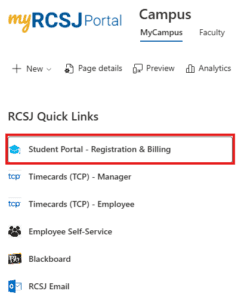
- Once logged in, click on “Student Portal – Registration & Billing”
- From the left-hand navigation menu, under the Academics dropdown, select Registration.

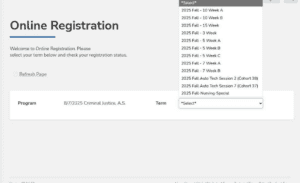
- On the next screen, select the term (i.e. Fall 15-week)
- Be sure to pick you ACTIVE major and not an older major.
- Please note that once you select the term, it will only show you courses for that term. If you search for 10-week courses, it will not show you any 15-week courses.
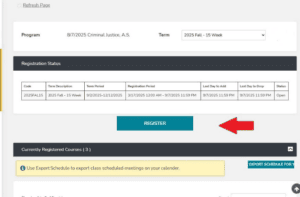
- Once you select the term, click Register in the center of the page.
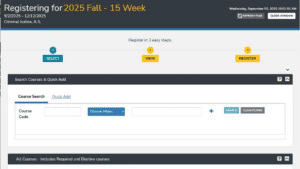
- A new window will open.
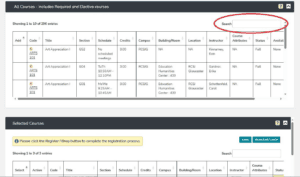
- Scroll down to “All Courses” and in the search bar on the right-hand side, type in the 4-letter course code followed by a space, then the 3-digit course number (i.e. MATH 050)
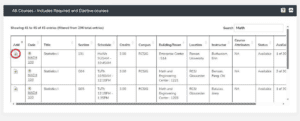
- After you locate the section of the course you want to join, check that it is on the correct RCSJ campus and that there are available seats by looking at the appropriate column. Then click the green + icon next to the course.
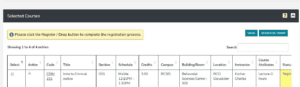
- The course will then appear under the “Selected Courses” box. Click the “Register/Drop” button in the top right-hand corner.
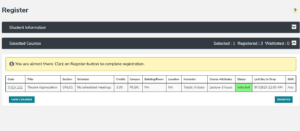
- The Status column will now appear green for the class you selected. Scroll down and click the “Register” button in the lower right-hand corner.
- When you are registered for the class, the box will turn yellow and say “Registered.”
- To confirm your courses and location, you can view your course schedule in your student portal.

Advisement
Your advisor is a dedicated partner and guide throughout your college journey, committed to supporting your academic and personal success. Students should schedule an appointment with their assigned academic advisor each semester to ensure they remain on track to complete their degree on time.


Academic Catalog
Students can use the RCSJ Academic Catalog to determine what courses they should select based on their major. It is always preferred that students meet with their advisor to ensure the proper courses are selected to fulfill degree requirements.